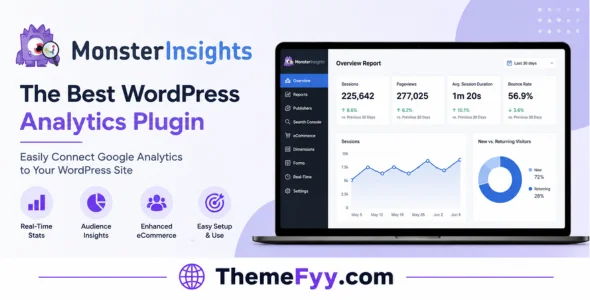
Understanding how visitors interact with your WordPress website is essential when you want to improve traffic, content, and conversions. MonsterInsights is a popular WordPress Google Analytics plugin that makes website analytics easier to understand directly from the WordPress dashboard.
Instead of constantly switching between different analytics reports, MonsterInsights brings important website statistics into WordPress and presents them through simple reports. You can monitor traffic, page views, sessions, user behavior, referrals, downloads, and other important metrics without needing to be an analytics expert.
MonsterInsights is suitable for blogs, business websites, online stores, publishers, agencies, and almost any WordPress website that wants a clearer overview of its visitors and performance.
MonsterInsights makes connecting Google Analytics with WordPress much easier. The setup process is designed to minimize complicated configuration and lets you start collecting website data without manually editing tracking code.
Once connected, your analytics information can be accessed directly from the WordPress dashboard.
2. Real-Time Statistics
The plugin provides reports that help you understand what is happening on your website.
You can monitor important activity such as current visitors, traffic sources, page views, and popular content, giving you a quick overview of website performance.
3. Traffic Reports
MonsterInsights provides detailed traffic reports that help you understand where visitors are coming from.
You can analyze sources such as search engines, referral websites, social networks, direct traffic, and other channels to identify which sources are contributing the most visitors.
4. Popular Posts & Pages
Knowing which content attracts the most visitors can help you make better publishing decisions.
MonsterInsights allows you to identify your most popular pages and posts so you can understand which topics and content formats perform best with your audience.
5. eCommerce Tracking
For WooCommerce websites and other online stores, MonsterInsights provides eCommerce tracking features that help monitor important shopping activity.
You can analyze product performance, transactions, revenue, conversion rates, and other useful eCommerce metrics from your WordPress dashboard.
6. Enhanced eCommerce Reports
Advanced eCommerce reporting provides deeper information about how visitors interact with products before completing a purchase.
This can help store owners understand which products generate the most interest and where customers are completing or abandoning the shopping process.
7. Affiliate Link Tracking
MonsterInsights can help track outbound and affiliate links so you can understand how visitors interact with links placed throughout your website.
This is particularly useful for affiliate websites that want to identify which links and pages generate the most clicks.
8. File Download Tracking
If your website provides downloadable files, MonsterInsights can track interactions with those files.
You can see which downloads receive the most activity and better understand what resources visitors find useful.
9. Custom Dimensions
MonsterInsights Pro provides advanced tracking capabilities through custom dimensions.
This allows you to analyze additional information such as authors, categories, tags, post types, and other dimensions depending on your website configuration.
10. SEO Score Tracking
MonsterInsights can connect analytics data with SEO-related information to help you understand how search traffic interacts with your content.
This makes it easier to identify content that attracts organic visitors and evaluate which pages are performing well.
11. Form Conversion Tracking
For websites that rely on contact forms, quote requests, registrations, or other forms, tracking conversions can provide valuable insight into how visitors become leads.
MonsterInsights can work with popular WordPress form plugins to help measure form interactions and conversions.
12. Customizable Reports
MonsterInsights provides a range of reports designed to make analytics easier to understand.
Rather than dealing with complicated analytics dashboards, you can focus on important information such as traffic, engagement, eCommerce performance, and conversions directly from WordPress.
Performance & Compatibility
MonsterInsights is designed to integrate with WordPress without requiring users to manually place analytics tracking code throughout their website.
It works with popular WordPress themes, page builders, WooCommerce, form plugins, SEO plugins, and other common WordPress tools.
The overall impact on website performance depends on the website configuration, hosting environment, active plugins, analytics setup, and the amount of tracking enabled.
For the best results, keep WordPress and your plugins updated and configure only the tracking features your website actually needs.
Pros & Cons
Pros
Easy Google Analytics integration.
Analytics reports inside WordPress.
Traffic source tracking.
Real-time statistics.
Popular content reports.
WooCommerce tracking.
Affiliate link tracking.
File download tracking.
Form conversion tracking.
Custom dimensions.
Useful eCommerce reports.
Beginner-friendly interface.
Works with many popular WordPress plugins.
Cons
Websites with complex tracking requirements may require additional configuration.
The number of available reports can feel overwhelming for beginners.
Who Should Use MonsterInsights?
MonsterInsights is a useful choice for WordPress website owners who want to understand their visitors without spending a lot of time working directly inside Google Analytics.
It can be especially useful for bloggers, publishers, business websites, affiliate marketers, WooCommerce stores, agencies, and content creators.
For beginners, the simplified reports can make website analytics much easier to understand. More advanced users can also benefit from detailed tracking features and custom reporting options.
Installation Guide
Installing MonsterInsights is straightforward.
Download the MonsterInsights ZIP file.
Log in to your WordPress dashboard.
Go to Plugins ? Add New Plugin.
Select Upload Plugin.
Upload the MonsterInsights ZIP file.
Click Install Now.
Activate the plugin.
Open the MonsterInsights setup wizard.
Connect your Google Analytics property.
Configure the tracking and reporting options you need.
Save your settings and start monitoring your website statistics.
After installation, give your analytics account enough time to collect data before making decisions based on the reports.
Download MonsterInsights WordPress Plugin
You can download MonsterInsights from our website with a fast, one-click download. Every file we share is carefully checked before publishing to help ensure it is clean and ready to use for testing and educational purposes.
We keep the download process simple and aim to provide the latest available version whenever possible, without unnecessary redirects or complicated steps.
= v10.2.2: May 29, 2026 =
– Fixes: Various bug fixes and updates
Frequently Asked Questions
What is MonsterInsights?
MonsterInsights is a WordPress Google Analytics plugin that brings important website analytics and reports directly into the WordPress dashboard.
Does MonsterInsights work with Google Analytics?
Yes. MonsterInsights is designed to connect WordPress websites with Google Analytics and simplify the process of viewing analytics data.
Can MonsterInsights track WooCommerce sales?
Yes. MonsterInsights Pro includes eCommerce tracking features that can help WooCommerce store owners monitor transactions, revenue, products, and conversion-related metrics.
Can MonsterInsights track downloads?
Yes. MonsterInsights can track file downloads, allowing you to identify which downloadable resources receive the most engagement.
Does MonsterInsights track affiliate links?
Yes. MonsterInsights provides outbound and affiliate link tracking features that can help website owners understand which links receive the most clicks.
Can I see Google Analytics inside WordPress?
Yes. MonsterInsights brings important analytics reports directly into the WordPress dashboard, making it easier to monitor website performance without constantly opening the Google Analytics interface.
Does MonsterInsights work with WooCommerce?
Yes. MonsterInsights supports WooCommerce and provides advanced eCommerce tracking and reporting features.
Is MonsterInsights beginner-friendly?
Yes. One of the main advantages of MonsterInsights is its simplified interface. It presents important analytics information in an easier-to-understand format compared with working directly with complex analytics reports.
Does MonsterInsights slow down WordPress?
MonsterInsights is designed to integrate efficiently with WordPress, but actual performance depends on your hosting, theme, plugins, tracking configuration, and overall website setup.
Can MonsterInsights track form conversions?
Yes. MonsterInsights can integrate with supported WordPress form plugins and help track form submissions and conversions.
Final Thoughts
MonsterInsights is a practical analytics solution for WordPress users who want a clearer understanding of their website traffic and visitor behavior. Its combination of Google Analytics integration, dashboard reports, traffic tracking, eCommerce analytics, affiliate link tracking, download tracking, and conversion reports makes it useful for a wide range of websites.
Whether you’re running a blog, business website, affiliate project, or WooCommerce store, MonsterInsights makes it easier to turn website data into useful insights without needing to become an analytics expert.